Enter password to view case study
Extending an
AI assistant across the product.
RoLE
UIUX designer / Visual Design
YEAR
2025-2026
Comapny
AlipayHK
ALIPAYHK · AI ASSISTANT
點止支付咁簡單
AlipayHK earned its reputation on payments, extend that trust into ten new services — so users can claim offers, discover deals, and finish tasks inside an AI assistant that actually feels helpful.
UX Prototype & UAT
DESIGN THINKING
UX Concept
User Interface
AI-First Design
PROJECT CONTEXT
Take the AI Assistant from a
single entry point to a full product experience.
🔶 Core entry + commercial coupon-bundle pages
🔶 Master AI component + reusable interaction pattern
🔶 Self-service flows (payment password, phone-number updates, Set a nickname)

THE CHALLENGE
From scattered pages to
one coherent AI.
The goal wasn't to redefine the product — it was to extend a proven direction into experiences that are intuitive, actionable, and built to scale.
01 · PRODUCT
AI stalls at the entrance.
Living only on the homepage, it never shows users how it helps with the next task.
02 · COMMERCIAL
Offers have no decision path.
Vouchers need to lead somewhere — into choices and next steps, not dead ends.
03 · SYSTEM
Tool pages are scattered.
Password and phone-number changes drift into standalone forms, disconnected from the assistant.
04 · DELIVERY
Page extensions drift out of sync.
More features demand one adjustable pattern, not a redesign per page.
THE SOLUTION
Clarify
Split into two Core paths
Extend
Connect entry to commercial content
Reuse
Integrate Master AI into system processes
Validate
Converge with flow logic and human judgment
ROLE / SCOPE
My contribution, in context.
I defined where I sat in the team, then translated the Design Lead, BD, and PD directions into shipped pages.
Set the direction
with the Design Lead
· Establish vision and foundations from BD/PD
· Outline visual + UX strategy
· Validate core design decisions
Extension
My Contribution
Core-entry extension
·
Commercial coupon-bundle pages
·
A lift in overall page completion
·
Focus
What I Solved
How to keep the AI experience
·
Apply the Master pattern across features
·
Turn scattered screens into one flow
·
I turned a defined AI assistant into a shorter flow and a more complete set of product experiences.

CORE 01 · AI ASSISTANT ENTRY
Make the next action obvious.
The first core sharpens the AI entry and its fundamentals — homepage recommendations, content exploration, coupons, and vouchers — every component built with commercial intent.


CORE 01 · COMMERCIAL EXTENSION
From entry to commercial pages
I connected the AI entry to the coupon, promotion, and wallet pages — closing the gap between product entry and commercial content.
Problem
AI stops at the home screen
· Users see recommendations but aren't interested
· Offers feel like content, not opportunity
· No clear path from AI prompt to action
Solution
Cards that drive decisions
· Show benefits, conditions, and context up front
· Let AI surface the most relevant offer for the user
· Give users a reason to act, not just browse
Conclusion
A complete commercial loop
· Entry → offer → claim → completed action
· AI feels continuous, not isolated
· Commercial pages become part of the AI experience
I helped transform the core entry into a more complete commercial experience, where cards support decisions instead of merely presenting content.
01 · DISCOVERY
Lower decision cost
AI reads the need first, then narrows the offers — so users reach the right one faster instead of scanning everything.
02 · RELEVANCE
Improve offer matching
Organize offers by intent and usage scenarios, rather than displaying all coupons equally.
03 · CONVERSION
Support the commercial choice
Benefits, conditions, and differences sit up front, so users can compare, claim, or act without hunting
04 · CONTINUITY
Complete the service loop
Recommendations connect to claiming, using, and follow-on services — the commercial experience continues past first exposure.
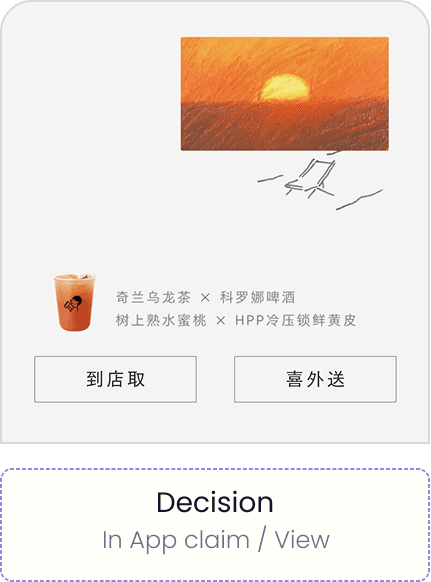
COMMERCIAL SERVICE CHAIN · FROM DISCOVERY TO RETAINED VALUE

User intent
Need / context

AI understanding
Filter / interpret

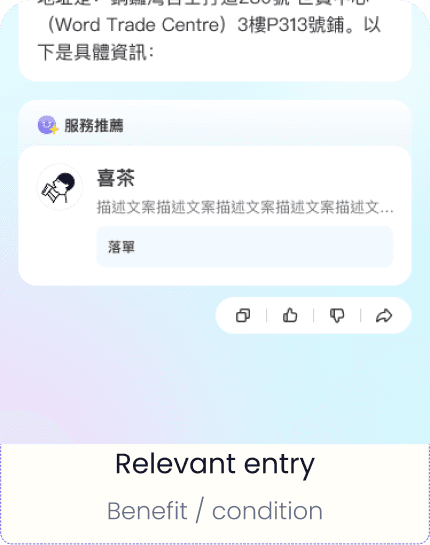
Relevant entry
Benefit / condition

Decision
In-app claim / view
ENTRY FLOW · INTENT INTO A RELEVANT ENTRY

Discover via auto slides
Enter from AI

AI understanding
Filter / interpret

Relevant offer
Enter campaign / complete

Relevant entry
Service / next need
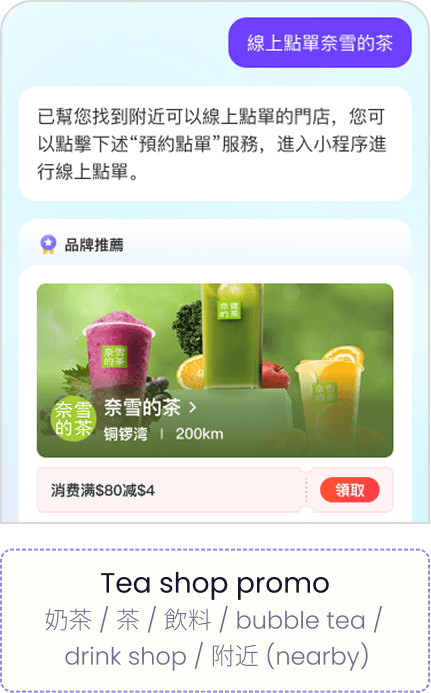
INTENT TRACKING · AI MATCHES KEYWORDS TO REWARDS

Ride services
AI打車 / 叫車 / 出行 / taxi /
ride / transport

Tea shop promo
奶茶 / 茶 / 飲料 / bubble tea /
drink shop / 附近 (nearby)

Relevant offer
飲品優惠 / coupon / 優惠 /
discount / 飲品 / deals

Tea merchant page
珍珠奶茶 / 喜茶 / 店鋪 / milk tea /
store info / 銅羅灣
FROM EARLY CONCEPT TO CURRENT BUILD
V0.1 Concept
Service search + basic categories
V1.0 Structure
Introduced the 4-card model and funnel
logic
V2.0 Personalization
Added AI intent understanding and
recommendations
V3.0 Integration
Connected API
and service systems
USER JOURNEY
One intention, four nodes.
The system absorbs the complexity in the background. Users only decide when it matters.
01
Say it, don't search for it
INTENT EXPRESSING
State what you want in natural language or from the current context. No hunting for functional entry points.
02
Decompose and call the backend
PARSE + TRIGGER
AI breaks a complex intent into atomic tasks, silently pulling the data, rules, and options it needs.
03
Assemble the interface on the fly
GENERATIVE UI
Key information arranges itself into a minimal decision interface that exists only for this step.
04
Decide on the spot, close the loop
DECIDE + CONFIRM
Fine-tune, confirm, done. The task ends and the interface retracts — no page jumps.

CORE 02 · MASTER AI INTO SYSTEM PAGE
Reduce service friction.
Support, reimagined — from one-way chatbot links to API-powered assistance. A Master AI layer lets users change passwords, update profiles, and manage settings entirely in natural language.

Traditional Chatbot vs GenUI Assistant
Static links that redirect · vs · a live UI that reacts to your input
GenUI · Explainer
Before
Traditional Chatbot
One-way traffic channel
I want to change my password
Sure! Please visit one of these pages 👇
→ Account Settings
→ Security Page
Chat box has no awareness of external page state
Chat box
✕
Settings Page
No bidirectional communication
VS
After
GenUI Smart Assistant
Bidirectional data pipeline
I want to change my password
Change Password — type to see live validation
New password
Enter new password
UI updates instantly as you type
UI senses backend state, renders elements dynamically
Chat box (Live)
⇄
Backend / DB
Real-time bidirectional communication
The confirm field appears only when needed, strength updates live, and the button activates only when every check passes. A traditional chatbot can't do any of that.
CORE 02 · SYSTEM PAGE
The longest flow, every state mapped.
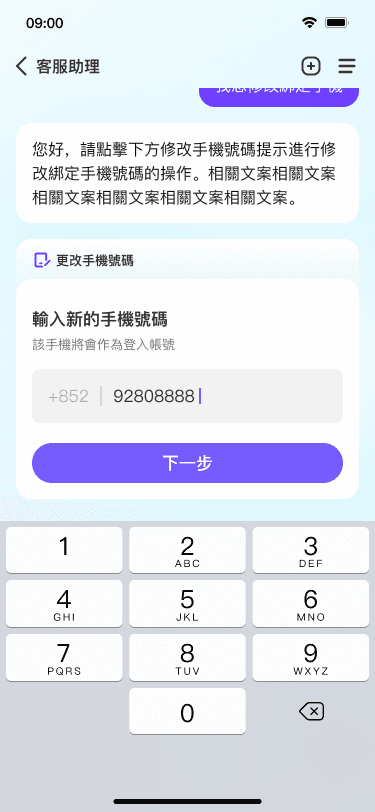
Phone-number update is the longest system flow. I broke it into page spacing, input cards, OTP modules, processing states, and success feedback — pre-building every modal for AI to learn from, so the UI language stays consistent.
Anatomy
Flow Structure
· Page spacing & layout grid
· Input card & phone field zones
· OTP module & button region
States
Flow structure
· Page spacing & grid
· Input card & phone-field zones
· OTP module & button region
Modals
Every handled state
· Pre-build all future possible modals
· Let AI learn from a complete sample set
· Keep UI language consistent and coherent
For the system-page core, I used Master AI as a reusable UX pattern across smaller self-service functions.
Design Process · 4 steps from raw components to system generation
Feed
Hand raw components to AI
→
Review
Flag what's missing
→
Generate
AI generates
sub-components
→
Polish
Refine UI and
alignment manually




MASTER PATTERN EXPLORER
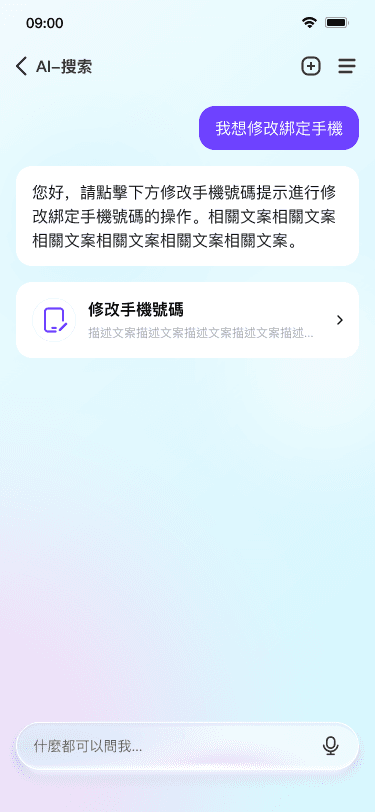
One pattern for every task.
The same structure switches between different system tasks.
Phone Number Update
Name Change
Password Change
WHAT I LEARNED
From Component to Product Experience
The value of this work is not to establish a framework that covers all pages, but to validate how the Master AI pattern can be extended and implemented within this scope.
What I Learned
01
Think in patterns
· Find the shared interaction model first
·Adapt content to function, not vice versa
·Stop reinventing AI on every page
02
Extend with Purpose
· Commercial pages convert
· System pages complete tasks
· One pattern serves both
03
Know the scope
· Focus on actual needs this time
· Don't overclaim a finished product system
· Name the larger framework as the next step
I learned to treat AI as both a product pattern and a design collaborator, with clear boundaries around scope and ownership.
THANK YOU
Structure holds. AI serves. People decide.
Long-term core products need a tight, disciplined framework as their foundation. AI should be introduced with restraint — not to replace human judgment, but to support it at the right moment. When the structure is strong, AI becomes a tool. When it isn't, AI becomes noise.
You may also be interested ...


ALIPAYHK · AI ASSISTANT
點止支付咁簡單
AlipayHK earned its reputation on payments. I extended that trust into ten new services — so users can claim offers, discover deals, and finish tasks inside an AI assistant that actually feels helpful.
UX Prototype & UAT
DESIGN THINKING
UX Concept Design
User Interface
AI-First Design
PROJECT CONTEXT
Take the AI Assistant from a single entry point to a full product experience.
Core entry + commercial coupon-bundle pages
Master AI component + reusable interaction pattern
Self-service flows (password, phone-number updates)
THE CHALLENGE
From scattered pages to one coherent AI.
The goal wasn't to redefine the product — it was to extend a proven direction into experiences that are intuitive, actionable, and built to scale.
02 · COMMERCIAL
Offers have no decision path.
Vouchers need to lead somewhere — into choices and next steps, not dead ends.
01 · PRODUCT
AI stalls at the entrance.
Living only on the homepage, it never shows users how it helps with the next task.
03 · SYSTEM
Tool pages are scattered.
Password and phone-number changes drift into standalone forms, disconnected from the assistant.
04 · DELIVERY
Page extensions drift out of sync.
More features demand one adjustable pattern, not a redesign per page.
THE SOLUTION
Clarify
Split into two Core paths
Extend
Connect entry to commercial content
Reuse
Integrate Master AI into system processes
Validate
Converge with flow logic and human judgment
ROLE / SCOPE
My contribution, in context.
I defined where I sat in the team, then translated the Design Lead, BD, and PD directions into shipped pages.
Set the direction
with the Design Lead
Establish vision and foundations from BD/PD
· Establish vision and foundations from BD/PD
·
Outline visual + UX strategy
· Outline visual + UX strategy
·
Validate core design decisions
· Validate core design decisions
·
Extension
My Contribution
Core-entry extension
·Core-entry extension
·
Commercial coupon-bundle pages
·Commercial coupon-bundle pages
·
A lift in overall page completion
·A lift in overall page completion
·
Focus
What I Solved
How to keep the AI experience
· How to keep the AI experience
·
Apply the Master pattern across features
· Apply the Master pattern across features
·
Turn scattered screens into one flow
· Turn scattered screens into one flow
·
I turned a defined AI assistant into a shorter flow and a more complete set of product experiences.
CORE 01 · AI ASSISTANT ENTRY
Make the next action obvious.
The first core sharpens the AI entry and its fundamentals — homepage recommendations, content exploration, coupons, and vouchers — every component built with commercial intent.
CORE 01 · COMMERCIAL EXTENSION
From entry to commercial pages
I connected the AI entry to the coupon, promotion, and wallet pages — closing the gap between product entry and commercial content.
Problem
AI stops at the home screen
· Users see recommendations but aren't interested
· Offers feel like content, not opportunity
· No clear path from AI prompt to action
Solution
Cards that drive decisions
· Show benefits, conditions, and context up front
· Let AI surface the most relevant offer for the user
· Give users a reason to act, not just browse
Conclusion
A complete commercial loop
· Entry → offer → claim → completed action
· AI feels continuous, not isolated
· Commercial pages become part of the AI experience
I helped transform the core entry into a more complete commercial experience, where cards support decisions instead of merely presenting content.
01 · DISCOVERY
Lower decision cost
AI reads the need first, then narrows the offers — so users reach the right one faster instead of scanning everything.
03 · CONVERSION
Support the commercial choice
Benefits, conditions, and differences sit up front, so users can compare, claim, or act without hunting
04 · CONTINUITY
Complete the service loop
Recommendations connect to claiming, using, and follow-on services — the commercial experience continues past first exposure.
02 · RELEVANCE
Improve offer matching
Organize offers by intent and usage scenarios, rather than displaying all coupons equally.
COMMERCIAL SERVICE CHAIN · FROM DISCOVERY TO RETAINED VALUE


ENTRY FLOW · INTENT INTO A RELEVANT ENTRY


INTENT TRACKING · AI MATCHES KEYWORDS TO REWARDS



FROM EARLY CONCEPT TO
CURRENT BUILD
V0.1 Concept
Service search + basic categories
V1.0 Structure
Introduced the 4-card model and funnel
logic
V2.0 Personalization
Added AI intent understanding and
recommendations
V3.0 Integration
Connected API
and service systems
USER JOURNEY
One intention, four nodes.
The system absorbs the complexity in the background. Users only decide when it matters.
01
Say it, don't search for it
INTENT EXPRESSING
State what you want in natural language or from the current context. No hunting for functional entry points.
02
Decompose and call the backend
PARSE + TRIGGER
AI breaks a complex intent into atomic tasks, silently pulling the data, rules, and options it needs.
03
Assemble the interface on the fly
GENERATIVE UI
Key information arranges itself into a minimal decision interface that exists only for this step.
04
Decide on the spot, close the loop
DECIDE + CONFIRM
Fine-tune, confirm, done. The task ends and the interface retracts — no page jumps.
CORE 02 · MASTER AI INTO SYSTEM PAGE
Reduce service friction.
Support, reimagined — from one-way chatbot links to API-powered assistance. A Master AI layer lets users change passwords, update profiles, and manage settings entirely in natural language.
Traditional Chatbot vs GenUI Assistant
Static links that redirect · vs · a live UI that reacts to your input
GenUI · Explainer
Before
Traditional Chatbot
One-way traffic channel
I want to change my password
Sure! Please visit one of these pages 👇
→ Account Settings
→ Security Page
Chat box has no awareness of external page state
Chat box
✕
Settings Page
No bidirectional communication
VS
After
GenUI Smart Assistant
Bidirectional data pipeline
I want to change my password
Change Password — type to see live validation
New password
Enter new password
UI updates instantly as you type
UI senses backend state, renders elements dynamically
Chat box (Live)
⇄
Backend / DB
Real-time bidirectional communication
The confirm field appears only when needed, strength updates live, and the button activates only when every check passes. A traditional chatbot can't do any of that.
CORE 02 · SYSTEM PAGE
The longest flow, every state mapped.
Phone-number update is the longest system flow. I broke it into page spacing, input cards, OTP modules, processing states, and success feedback — pre-building every modal for AI to learn from, so the UI language stays consistent.
Anatomy
Flow Structure
· Page spacing & layout grid
· Input card & phone field zones
· OTP module & button region
States
Flow structure
· Page spacing & grid
· Input card & phone-field zones
· OTP module & button region
Modals
Every handled state
· Pre-build all future possible modals
· Let AI learn from a complete sample set
· Keep UI language consistent and coherent
For the system-page core, I used Master AI as a reusable UX pattern across smaller self-service functions.
Design Process · 4 steps from raw components to system generation
Feed
Hand raw components to AI
Review
Flag what's missing
Generate
AI generates
sub-components
Polish
Refine UI and
alignment manually
MASTER PATTERN EXPLORER
One pattern for
every task.
The same structure switches between different
system tasks.
Phone Number Update
Name Change
Password Change
From Component to Product Experience
The value of this work is not to establish a framework that covers all pages, but to validate how the Master AI pattern can be extended and implemented within this scope.
What I Learned
01
Think in patterns
· Find the shared interaction model first
·Adapt content to function, not vice versa
·Stop reinventing AI on every page
02
Extend with Purpose
· Commercial pages convert
· System pages complete tasks
· One pattern serves both
03
Know the scope
· Focus on actual needs this time
· Don't overclaim a finished product system
· Name the larger framework as the next step
I learned to treat AI as both a product pattern and a design collaborator, with clear boundaries around scope and ownership.
THANK YOU
Structure holds. AI serves. People decide.
Long-term core products need a tight, disciplined framework as their foundation. AI should be introduced with restraint — not to replace human judgment, but to support it at the right moment. When the structure is strong, AI becomes a tool. When it isn't,
AI becomes noise.
